It shouldn’t come as any surprise: online shopping is surging. COVID-19 lockdowns made many of the in-person shopping methods we all used for years an impossibility.
With people spending more time online, making more online purchases, it’s now rare to find a day where an Amazon or DoorDash delivery doesn’t make an appearance at a household or business.
In other words, online shopping is part of our everyday.
43% of shoppers now feel more positive about shopping online. Almost 40% of consumers report they’re more comfortable with digital technology than before lockdown (Wunderman Thompson Commerce).
Not only are people shopping more online, the value of their order is climbing, too.
The average items per order increased by 60% during the COVID-19 outbreak (Contact Pigeon).
Now is the time
To make the most of this trend, and give yourself an additional revenue stream, now is the time to invest in an online store for your martial arts and fitness business. And, if you’re a Member Manager software user, you’re more than halfway to the finish line!
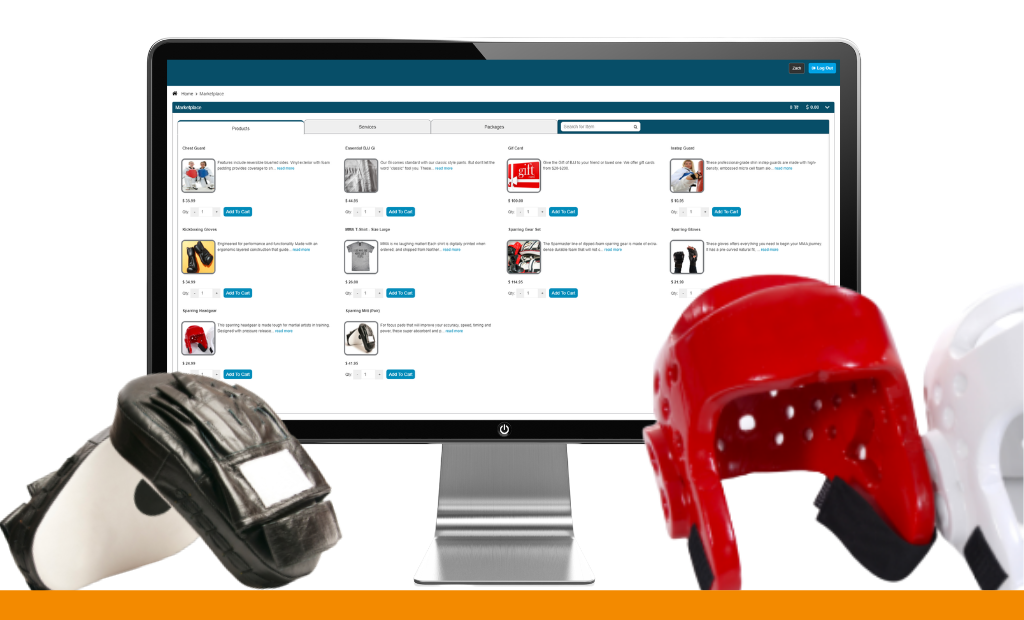
Recently, we released enhancements to the Member Portal within Member Manager software. One of those enhancements, the Marketplace, serves as your online store, hosted in the one-stop hub your members are already accustomed to using: the Member Portal.
The new Marketplace completely reorganizes the online store for an enhanced online shopping experience. Members can now choose between products, services, and packages, do a keyword search across all categories, and easily add items to their cart.
Not only is the new Marketplace enhanced from the member’s perspective, it’s incredibly easy for schools and gyms to upload product inventory, packages, and services — and start selling right away.
Setting up the Marketplace
In Member Manager software, you now have the option to set up items for purchase in the Marketplace or set up the item to be sold only from the Member Manager point of sale.
To add products to your Marketplace, go to Setup > Inventory > Items > Add Item. Click “allowed for store”. You can also upload an image of the item.
You’ll repeat this step for each product, service, and package that you want to sell in the Marketplace. Here’s an example of what a school or gym’s Marketplace would look like.